Life & fun · alternatives · 2026

24 alternatives to Getscreen.me – Remote Access to Any Desktop from a Browser
Instantly access and control desktops from any web browser. Perfect for IT administration, technical & customer support, and more. Unlimited concurrent connections and easy integration.
Getscreen.me is a remote desktop application that allows users to access any desktop computer through a web browser. Launched in 2020, it enables remote access without requiring software installation on the target… Below are 24 products that do a similar job, ranked by how close each is in meaning and then by launch-day votes. Prices are shown for the 4 we have checked on their own sites, 4 of them free or with a free tier. Getscreen.me – Remote Access to Any Desktop from a Browser launched in 2020; newer entries below may have overtaken it.
- 1

- 2
 Screen – screen sharing for remote work, by the cofounder of Screenherofree tier, from $25/mo▲406
Work together like you’re in the same room. Supports Mac, Windows, Linux, iOS, Android, Safari, Firefox & Chrome.
2020 · screen.so · its alternatives →
- 3

Bring your team closer to you. One click to share and remote control any window. Get things done together like never before.
2019 · coscreen.co · its alternatives →
- 4
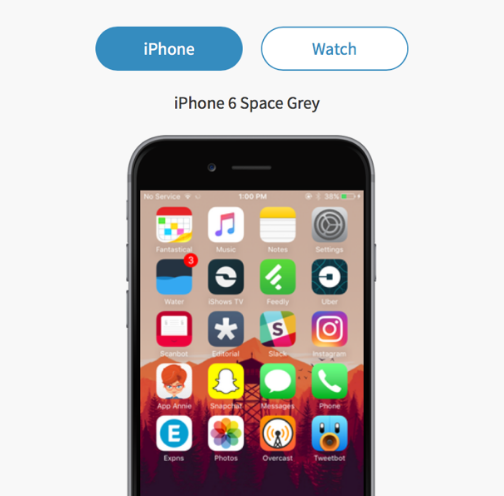 Homescreen.me▲288
Share your homescreen and discover new apps.
2016 · homescreen.me · its alternatives →
- 5
 Fed up with WebEx, so we built a way to screen share in under 20 sec.free tier, from $15/mo▲402
Free screen sharing using Screenleap. The fast, simple, and free way to share your screen instantly for online meetings, sales demos, and collaboration.
2012 · screenleap.com · its alternatives →
- 6

💚🇺🇸🗽Secure remote browsing anywhere, any way you like it. - GitHub - BrowserBox/BrowserBox: 💚🇺🇸🗽Secure remote browsing anywhere, any way you like it.
2019 · github.com · its alternatives →
- 7IM
Hi HN, I've been working on this project for the last 5 months, inspired by Screen Studio but runs 100% in the browser. Here is a demo of the editor: https://www.youtube.com/watch?v=k7-etsFZgPI One of the big challenges of using the browser is getDisplayMedia, the API for recording screens, doesn't provide mouse coordinates for security reasons. Mouse coordinates are important for auto-focus animations. So I trained a YOLOv11 model to detect mouse cursors and I run inference in real time while you record. Also, I created my own Remotion-style renderer because I started with…
2025 · screenrecorder.me · its alternatives →
- 8

The fastest web client for Remote Desktop. You don't need to install any plugins or client software to connect. All your computers are always one click away from any browser.
2018 · allmydesktops.com · its alternatives →
- 9

- 10

Seeing all the hype around Bolt.new, I decided to give it a try, and within just 30 minutes, I built a fully functional web app for screen sharing. How It Works: - One user opens a room and receives a unique code. - Participants join by simply entering the code to view the shared screen. After that initial build, I moved the project to Cursor to continue iterating and enhancing its features. Github: https://github.com/tonghohin/screen-sharing Demo: https://share-your-screen.vercel.app
2024 · github.com · its alternatives →
- 11

Access your computer from your iOS device
2015 · apps.apple.com · its alternatives →
- 12

Instantly detect your browser, operating system, screen resolution, and more. Get a shareable link with your browser details for support agents.
2012 · aboutmybrowser.com · its alternatives →
- 13
 RecordScreen.io▲305
Record screen right from browser. No installation required.
2019 · recordscreen.io · its alternatives →
- 14

- 15
 join.me button▲185
Instant screen sharing, in your product
2015 · developer.join.me · its alternatives →
- 16

🖥️ P2P Remote Desktop - Portable peer-to-peer remote desktop with no installation required. - miroslavpejic85/p2p
2021 · github.com · its alternatives →
- 17

- 18

- 19MD
Good to be back on HN with all-new CoScreen, a little more than 3 years after it launched over here! With CoScreen 5.0, you can now share your windows from multiple displays at the same time, a long standing request by our most avid users and impossible in other apps. It also has a lightning-fast, Rust-based window compositing, scaling, and streaming engine now. CoScreen was always meant to be different so that you and your team can share your screens simultaneously and multi-directionally, and to be able to control what is being shared. We saw it as a natural extension and closely coupled…
2023 · blog.coscreen.co · its alternatives →
- 20
 Screen Recorder▲330
A minimal, ad-free screen recorder in your browser
2020 · snipclip.app · its alternatives →
- 21

- 22

Free Screen Share Party App - Share Movies Videos YouTube Games - No Install No Registration Browser WebRTC E2EE BA.net screencast broadcast audiocast conference meeting online podcasting videocasting webminars livestream youstream
2020 · ba.net · its alternatives →
- 23

Low latency, high resolution screensharing and remote control. Free and open source, from the makers of CoScreen.
9d ago · petal.live · its alternatives →
- 24

Learn how to share your browser window instantly and for free using the Screenleap browser extension.
2012 · screenleap.com · its alternatives →
Also compare
- Getscreen.me alternatives
- Screen – screen sharing for remote work, by the cofounder of Screenhero alternatives
- Coscreen.co – a radically different remote collaboration tool alternatives
- Homescreen.me alternatives
- Fed up with WebEx, so we built a way to screen share in under 20 sec. alternatives
- A remote browser product, open-sourced alternatives
Ranked by how close each launch is in meaning, then by votes. Prices were read from each product’s own site when checked and can change. Refine with your own description →