AI · alternatives · 2026

24 alternatives to Oh-heck, a terminal command for when you forget other terminal commands
Always Googling those pesky Terminal commands? Use AI to find the commands for you from within the command line.
Oh-heck is a terminal utility designed for developers who frequently forget command syntax. It runs as a command-line tool that helps users quickly look up and recall terminal commands when their memory fails. Launched… Below are 24 products that do a similar job, ranked by how close each is in meaning and then by launch-day votes. Oh-heck, a terminal command for when you forget other terminal commands launched in 2022; newer entries below may have overtaken it.
- 1

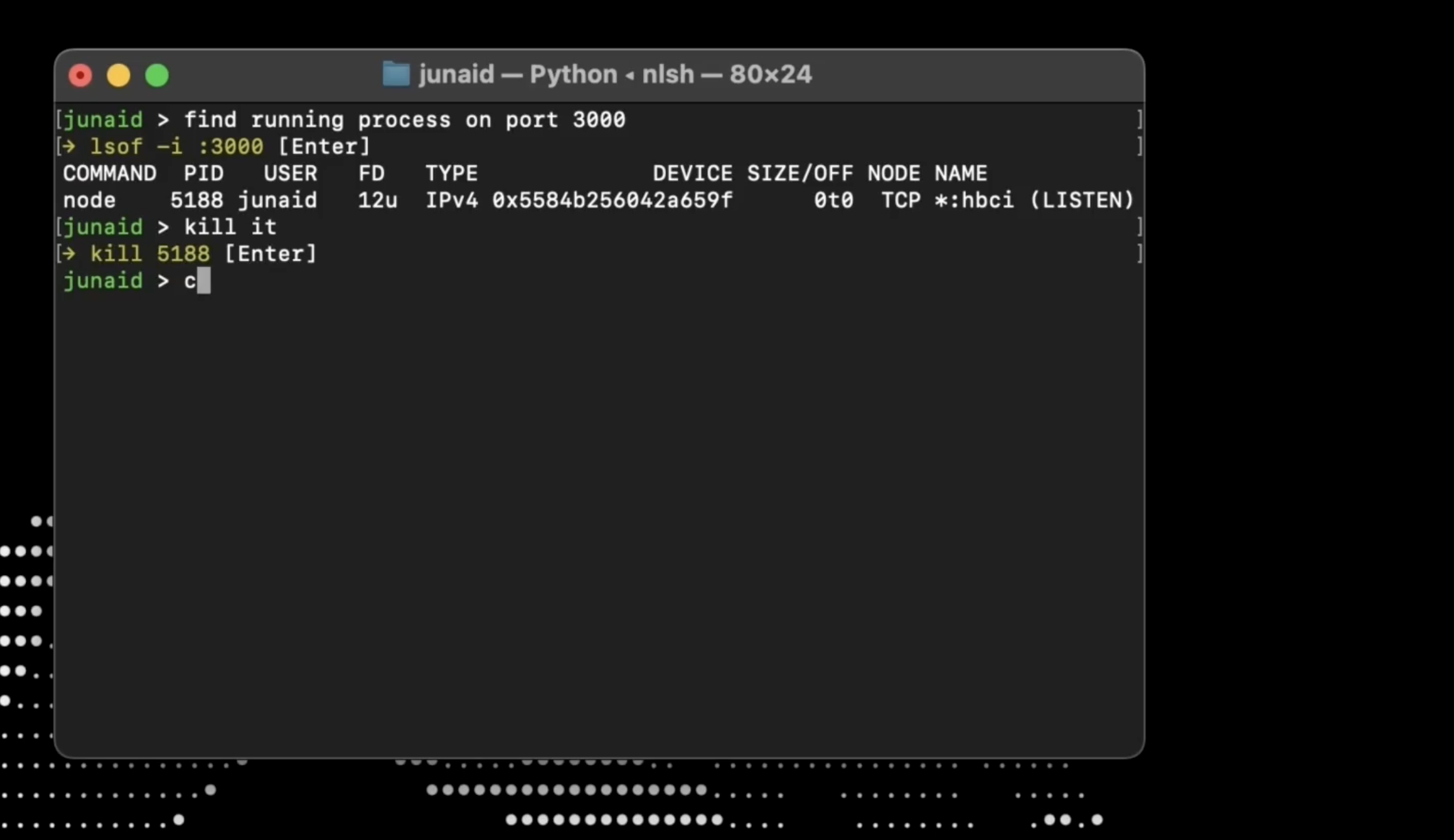
I'm often in the terminal and forget a command (or never knew it in the first place). This is a simple tool that lets you type out what you want, gives you several options, and then automatically puts the one you want in your clipboard.
2025 · github.com · its alternatives →
- 2MT
2019 · memorize-terminal-commands.com · its alternatives →
- 3

Hi HN community, I’m Zach, founder and CEO of Warp, and am excited to show you Warp, a fast Rust-based terminal that’s easy to use and built for teams. As of today, Warp is in public beta and any Mac user can download it. It works with bash, zsh, and fish. The terminal’s teletype-like interface has made it hard for the CLI to thrive. After 20 years of programming, I still find it hard to copy a command’s output; I always forget how to use `tar`; and I always have to relearn how to move my cursor. To fix fundamental accessibility issues, I believe we need to start innovating on the terminal,…
2022 · warp.dev · its alternatives →
- 4

- 5

I made a terminal pager that can be used instead of more, less, tail -f. It has a mode that distinguishes between headers and columns.
2023 · github.com · its alternatives →
- 6

There are multiple programs for working with log files, both inside and outside of the terminal. These tools are feature rich and functional and offer lots of control to the user. However, a lot of the time I found myself just opening raw log files in `less`. I enjoy the simplicity of quickly skimming through the logs, but it was difficult when the wall of text was in one color. For this reason, I created a command line tool called `tailspin` (the name is a take on the `tail` command) that did one thing: highlighting of log files. It is configurable, but requires no setup. It defaults to…
2023 · github.com · its alternatives →
- 7
 ShellMate AI▲342
While "burning tokens" isn't necessarily a good thing, I thought it worthwhile to throw together a quick leaderboard to track the dev setups of the top HN token burners. Jesse (https://en.wikipedia.org/wiki/Jesse_Vincent), Wes (https://en.wikipedia.org/wiki/Wes_McKinney), and Harper (https://en.wikipedia.org/wiki/Harper_Reed) are using it to report their Claude/Codex usage.
2024 · tkmx.odio.dev · its alternatives →
- 8
 Ask Command▲118
AI-powered app to remember those commands you always forget
2022 · askcommand.com · its alternatives →
- 9

- 10
- 11

A smarter shell and scripting environment with advanced features designed for usability, safety and productivity (eg smarter DevOps tooling) - lmorg/murex
2023 · github.com · its alternatives →
- 12
 TermHere▲147
“Open Terminal Here” shortcut for Finder
2016 · hashbang.productions · its alternatives →
- 13
 Billy.sh▲81
Local AI coding assistant for your terminal using Ollama
Mar 2026 · billysh.online · its alternatives →
- 14
- 15

When you have a lot of aliases it can be difficult to remember how was the one you need named especially if you do not use it very often. You can also have files stored in a bin folder and look there to find the name. Another trick is to prepend your commands with a comma then type the comma and hit the Tab key to see only your own commands. There is an article about it somewhere on the Internet. I needed something lightweight to always show me the available commands. Something to run with a few keystrokes. Something that stores commands in files and folder structures. The idea was born at…
2025 · github.com · its alternatives →
- 16

2020 · github.com · its alternatives →
- 17

Funky takes shell functions to the next level by making them easier to define, more flexible, and more interactive. - bbugyi200/funky
2018 · github.com · its alternatives →
- 18

⚡Rapid note management for the terminal. Contribute to shashwatah/jot development by creating an account on GitHub.
2022 · github.com · its alternatives →
- 19

A copilot for your terminal. Contribute to cloudycotton/whiz development by creating an account on GitHub.
2023 · github.com · its alternatives →
- 20

Fly through your shell history. Great Scott! Contribute to cantino/mcfly development by creating an account on GitHub.
2018 · github.com · its alternatives →
- 21

Search and save shell snippets without leaving your terminal - ok-borg/borg
2016 · github.com · its alternatives →
- 22
 Otty▲142
Otty is a native, beautiful terminal app. Designed for anyone who cares about the feel of every keystroke.
Jun 2026 · otty.sh · its alternatives →
- 23

A better history. Contribute to 9seconds/ah development by creating an account on GitHub.
2014 · github.com · its alternatives →
- 24

Daily notes command line tool. Contribute to tomlockwood/dn development by creating an account on GitHub.
2019 · github.com · its alternatives →
Also compare
Ranked by how close each launch is in meaning, then by votes. Prices were read from each product’s own site when checked and can change. Refine with your own description →