
ScreenScout
Search screenshots by what's in them, not the filename
ScreenScout launched on March 20, 2026 with 2 votes, #5,166 of 23,380 launches that month.
What it does
ScreenScout indexes every screenshot on your Mac using on-device OCR and makes the text inside instantly searchable. Trigger it from anywhere with a global hotkey, type what you remember seeing, and find the screenshot in seconds. No cloud, no account, 100% private. Free for up to 200 screenshots, $19 one-time for unlimited.
Find any screenshot in seconds. Search by what
Search by what's in the image, not the filename. ScreenScout reads every screenshot on your Mac and makes the text inside instantly searchable. Point ScreenScout at your screenshot folders. It handles the rest. ScreenScout watches ~/Desktop by default. Add more directories in Settings if your screenshots land somewhere else. Every image is processed using Apple's Vision framework. Text is extracted and indexed on your Mac. Nothing leaves your machine. Trigger ScreenScout from anywhere with a customizable global shortcut. Type what you remember seeing, and it finds the screenshot. Developers, designers, and anyone who knows the answer is in a screenshot somewhere. Full-text search powered by…from screenscout.dev
Does a similar job
all alternatives →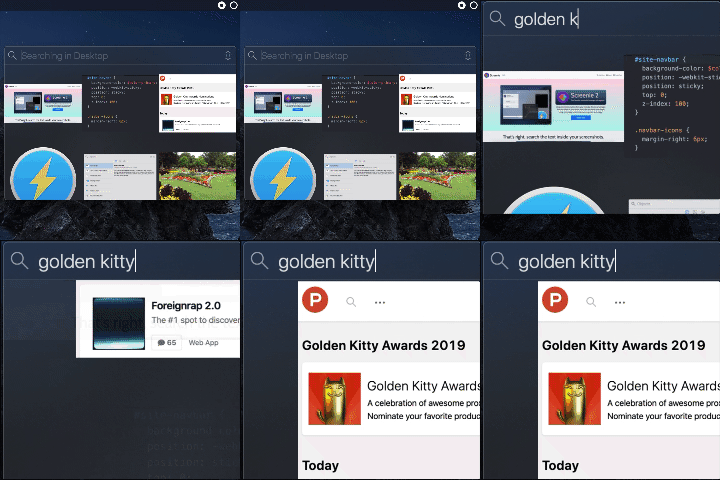
 I wrote a free Mac app to OCR any text on screen2021 · github.com · ▲321
Get any text on your screen into your clipboard. Contribute to schappim/macOCR development by creating an account on GitHub.



- OTOffline text extractor from screenshots in macOS2020 · ▲125
I've always had an issue with the screenshot flow on my computers. They save to the desktop by default and I can't seem to find screenshots easily when I needed it. They create too much clutter too. So I set out to solve this problem. My major concern was with privacy so I made sure to make it work entirely offline. Here's the final product, let me know what you think. - https://visionshot.app/
More dev tools this month
the category →

open-source IDE for thoughtful software design. Contribute to devdotfast/whiteboard development by creating an account on GitHub.
Dev tools · 28d ago · github.com

Contribute to reladraw/reladraw development by creating an account on GitHub.
Dev tools · 26d ago · github.com
 OpenBot▲362
Grok Bot alternative: free, local, open-source, multiplayer
Dev tools · 23d ago · openbot.run
 Talanoa▲346
Hi HN, I’m a fullstack developer, and honestly, I’ve lost count of how many side projects I’ve worked on over the years. But one idea kept coming back to me: a different kind of email client. It first came to me in 2014: “What if we could handle emails more like conversations?” Every year, I’d revisit this concept in my “Build Notes.” Ten years later, no one had built exactly what I had in mind — so I finally decided to do it myself. That’s how Talanoa was born. I wanted something focused on people, not timelines. I was tired of marking messages as unread just to remember to reply later, or…
Dev tools · 21d ago · talanoa.email
 CoreSpeed▲332
One MCP for everything your agents need: apps, memory, tools
Dev tools · 28d ago · corespeed.io
Source: Product Hunt launch ↗
Launched alongside, March 2026
the whole month →


Switch from ChatGPT to Claude with import memory feature
AI · Mar 2026 · claude.com
 Littlebird▲709
Littlebird remembers everything across your meetings, messages, docs, and apps, then takes action so you can recall any detail and never lose context.
AI · Mar 2026 · littlebird.ai

